
Business Process Automation: How Automation Improves Operational Efficiency
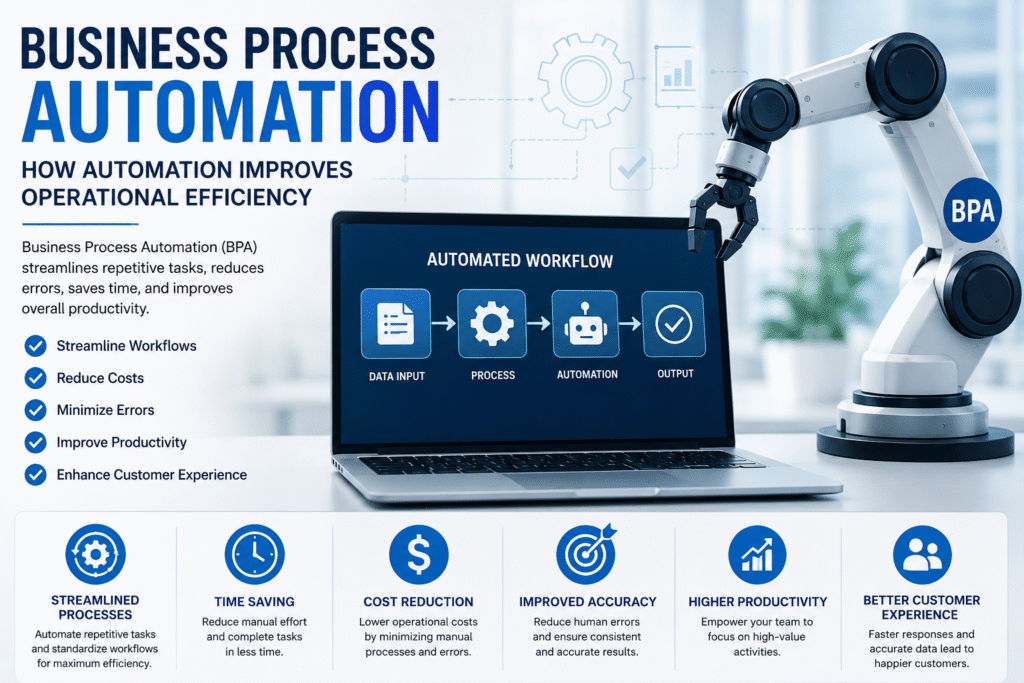
In today’s fast-paced business environment, organizations are constantly looking for ways to improve productivity, reduce operational costs, and deliver better customer experiences. Manual processes, repetitive tasks, and disconnected workflows can slow down business operations and increase the risk of human error.
Business Process Automation (BPA) provides an effective solution by using technology to automate repetitive and rule-based business activities. By streamlining workflows and reducing unnecessary manual intervention, automation enables organizations to operate faster, smarter, and more efficiently.
What Is Business Process Automation?
Business Process Automation (BPA) is the use of technology to automate repetitive, time-consuming, and rule-based business processes. Instead of relying entirely on employees to complete every step manually, automated systems can perform specific tasks based on predefined rules and workflows.
Business process automation can be applied to various areas, including:
- Employee onboarding
- Invoice processing
- Customer onboarding
- Data entry and management
- Sales and lead management
- Approval workflows
- Document processing
- Customer support
- Email notifications
- Reporting and data collection
The primary objective of BPA is not simply to replace manual work but to create more efficient workflows that allow employees to focus on strategic and high-value activities.
Why Is Business Process Automation Important?
As organizations grow, their operational processes often become more complex. Employees may need to work with multiple systems, manually transfer data, send repetitive emails, or wait for approvals before completing tasks.
These challenges can result in:
- Delayed workflows
- Increased operational costs
- Data entry errors
- Poor process visibility
- Reduced employee productivity
- Inconsistent customer experiences
Business process automation addresses these challenges by connecting workflows and automating repetitive activities. This allows businesses to complete processes faster while maintaining greater consistency and accuracy.
How Business Process Automation Improves Operational Efficiency
1. Reduces Repetitive Manual Tasks
Employees often spend valuable time performing repetitive activities such as entering data, generating reports, sending notifications, and processing documents.
Automation can handle these routine tasks automatically, reducing the workload on employees and allowing them to focus on more important responsibilities.
For example, when a customer submits an online inquiry, an automated workflow can capture the information, update the CRM system, notify the sales team, and send an acknowledgment email without requiring manual intervention.
2. Saves Time and Speeds Up Workflows
Manual processes often involve multiple steps and approval stages that can create unnecessary delays. Automated workflows can move tasks between departments and systems instantly based on predefined rules.
This can significantly reduce process completion times and help organizations respond faster to customers and business opportunities.
3. Minimizes Human Errors
Manual data entry and repetitive tasks can increase the possibility of mistakes. Even small errors can create operational problems and require additional time to correct.
Automation performs tasks according to predefined rules, helping organizations improve data accuracy and maintain consistency across business processes.
4. Improves Employee Productivity
Automation allows employees to spend less time on repetitive administrative work. Instead, they can focus on activities that require creativity, critical thinking, communication, and decision-making.
This not only improves productivity but can also contribute to greater employee satisfaction by reducing unnecessary workloads.
5. Reduces Operational Costs
Automating repetitive processes can help organizations use their resources more efficiently. By reducing manual effort and improving workflow speed, businesses can lower the time and resources required to complete routine operations.
Over time, process automation can contribute to improved cost efficiency and better utilization of employees and technology.
6. Enhances Process Visibility
Automated workflows can provide businesses with greater visibility into their operations. Managers can track the progress of tasks, identify bottlenecks, and monitor performance through dashboards and reports.
This information helps organizations understand how their processes are performing and where improvements may be required.
7. Improves Customer Experience
Customers expect quick responses and efficient service. Delays in order processing, customer support, or communication can negatively affect customer satisfaction.
Automation can help businesses provide faster and more consistent services by automating notifications, customer requests, support workflows, and follow-ups.
Common Examples of Business Process Automation
Business automation can be implemented across almost every department of an organization.
Finance and Accounting
Automation can simplify processes such as:
- Invoice generation
- Invoice approval
- Payment processing
- Expense management
- Financial reporting
Automated financial workflows can reduce manual data entry and help accounting teams manage transactions more efficiently.
Human Resources
HR departments can automate employee onboarding, leave requests, attendance management, document collection, and employee notifications.
For example, once a new employee joins an organization, an automated workflow can send onboarding documents, create accounts, notify relevant departments, and assign training tasks.
Sales and Marketing
Automation can help sales teams manage leads, schedule follow-ups, send emails, update CRM records, and track customer interactions.
This enables sales teams to respond to potential customers more quickly and maintain consistent communication.
Customer Service
Customer support automation can route customer inquiries to the appropriate department, send automated responses, create support tickets, and notify customers about request status.
This can improve response times while allowing support teams to focus on more complex customer issues.
Procurement and Operations
Organizations can automate purchase requests, approval processes, vendor communication, inventory updates, and order management.
This helps businesses create more structured and transparent operational workflows.
Technologies Used in Business Process Automation
Modern automation solutions often combine multiple technologies to create efficient and connected workflows.
Robotic Process Automation (RPA)
RPA uses software bots to perform repetitive, rule-based tasks such as data entry, file processing, and system-to-system data transfer.
Artificial Intelligence (AI)
AI can help organizations automate tasks that require data analysis, pattern recognition, classification, and intelligent decision-making.
Workflow Automation
Workflow automation connects different steps of a business process and automatically moves tasks from one stage to another according to predefined rules.
Cloud Computing
Cloud-based automation platforms allow businesses to access workflows and applications from different locations while improving scalability and collaboration.
APIs and System Integration
APIs allow different software applications to communicate with each other. Integration helps businesses connect CRM, ERP, HR, accounting, and other systems to create seamless workflows.
Business Process Automation vs. Business Process Management
Business Process Automation and Business Process Management are closely connected but serve different purposes.
Business Process Management (BPM) focuses on analyzing, designing, monitoring, and continuously improving business processes.
Business Process Automation (BPA) focuses on using technology to automate specific tasks and workflows.
In many organizations, BPM and BPA work together. Businesses first analyze and optimize their processes through BPM and then use automation technologies to improve execution and efficiency.
Best Practices for Implementing Business Process Automation
Successful automation requires careful planning. Organizations should consider the following best practices:
Identify the Right Processes
Start with repetitive, rule-based processes that consume significant time and resources. These processes are often the best candidates for automation.
Optimize Before Automating
Automating an inefficient process may simply make a bad process run faster. Businesses should first simplify and improve workflows before implementing automation.
Set Clear Goals
Define measurable objectives such as reducing processing time, improving accuracy, increasing productivity, or improving customer response times.
Involve Employees
Employees who work directly with business processes can provide valuable insights into operational challenges. Their involvement can help organizations design more practical and effective automation solutions.
Monitor Performance
After implementation, businesses should track important performance indicators to measure the effectiveness of automation and identify opportunities for further improvement.
The Future of Business Process Automation
The future of business automation is closely connected to advancements in artificial intelligence, machine learning, intelligent automation, and cloud technologies.
Organizations are increasingly moving beyond simple task automation toward intelligent systems that can analyze information, predict outcomes, and support decision-making.
The combination of AI, RPA, workflow automation, and business analytics is expected to create more intelligent and adaptable business processes. Companies that adopt these technologies strategically can improve operational agility and respond more effectively to changing market demands.
Conclusion
Business Process Automation is becoming an essential strategy for organizations that want to improve operational efficiency and remain competitive in a digital-first business environment.
By automating repetitive tasks, reducing errors, speeding up workflows, improving process visibility, and empowering employees, automation can transform the way businesses operate.
However, successful automation requires more than simply adopting new technology. Organizations should carefully analyze their existing processes, identify the right opportunities for automation, and continuously monitor performance.
When implemented strategically, Business Process Automation can help organizations build faster, smarter, and more efficient operations while creating greater value for employees and customers.